Prepare for the Pond - Structures
The Proposed Catchments were routed to the Site-Outfall for Pre/Post-Development comparison – primarily to get two curves on the same graph.
In actuality, the post-development rainfall won’t be going straight to the Site Outfall. Ultimately the runoff may travel overland (grass or pavement), in ditches or gutters, through pipes and – because it’s the point here – through a pond.
Post-development runoff is most accurately calculated through its actual collection and conveyance model; but sufficiently accurate estimates can be made with less than the fully-modeled system.
In this exercise we’ll proceed with the minimum requirements (post-development Catchments discharging directly into the pond endwall):
1. an Outfall structure into the pond
2. a Pond Outfall Structure
3. a Pond Feature (a shape designated to “hold” the hydraulic requirements of a pond (storage characteristics, etc.)
4. A Pipe between the Pond Outlet Structure and the Site Endwall
Notes about Pond Features
Note that there is not a tight binding between the 2D shape that becomes an OpenRoads Pond Feature and a Terrain that may include/represent a pond.
If you don’t have a 3D existing or proposed pond, don’t bother creating one. Use an arbitrary shape of any size – the numbers needed for calculation have no requirement to be represented graphically. At all.
Notes about Place a Pond – From Terrain Model
There is a Pond Method option to Calculate the Storage values From Terrain Model. This is excellent if you have a pond grading that is accurate or a “good starting estimate”. The option will read the terrain and provide Elevation-Area values for volume calculations. This is simply a table (a “collection”) stored in the Pond Feature.
There is no “Update Pond Volume from Terrain” tool. If your grading changes, the Elevation-Area values in the Pond Feature must be changed manually.
When iterating a design, there is no hydraulic/calculation advantage to regrading the pond. Just change the values in the Pond Feature table. Once you have a pond geometry numbers that work, then grade the pond as needed.
Place the Pond Endwall
We’ll place an Endwall inside the pond, north side.
- Click Drainage and Utilities > Layout Place Node.
- For Feature Definition, select Generic Endwall.
- It helps to have a clear name. Type Pond-Endwall in Name Prefix and hit <Tab> (to lock in the Name)

- Exact Location and Elevation does not matter much because it will ultimately be adjusted based on the pond grading and any upstream requirements. You can adjust later.
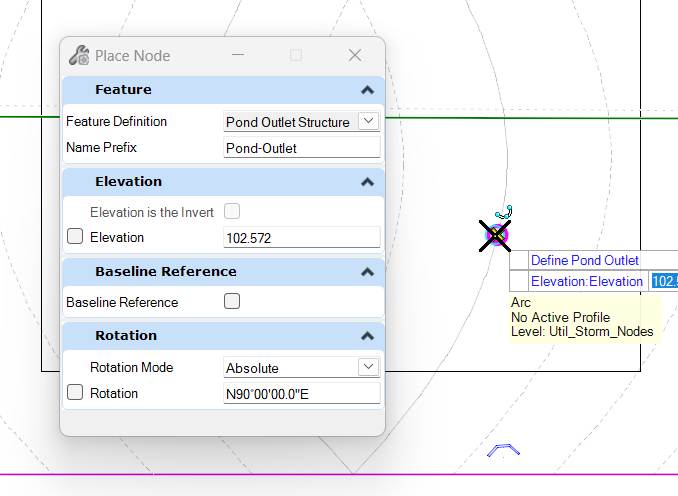
Place the Pond Outlet Structure
We’ll place a Pond Outlet Structure inside the pond, north of the Site Endwall.
|
 |
|
 |